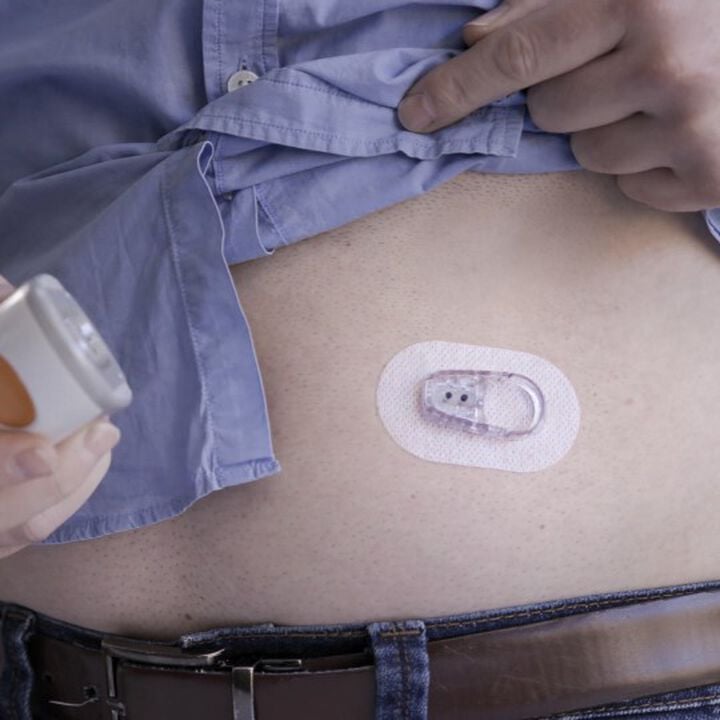
Dexcom ONE Sensor - 3-Pack
- ✔️ Measures glucose every 5 minutes, day and night
- ✔️ No fingerprick calibration needed during wear
- ✔️ Each sensor lasts up to 10 days continuously
- ✔️ 3-pack provides up to 30 days of glucose monitoring
- ✔️ Real-time alerts for high and low glucose levels
Price Checker
 Lowest price guarantee
 Includes FREE private prescription


Couldn't load pickup availability
What Is the Dexcom ONE Sensor and How Does It Help With Diabetes?
Managing blood glucose effectively is one of the most important parts of living with diabetes — and knowing your levels in real time makes that task considerably easier. The Dexcom ONE sensor is a continuous glucose monitoring (CGM) device that measures your glucose levels automatically, every five minutes, without the need for routine fingerprick testing. Each sensor is worn discreetly on the body for up to 10 days, sending readings wirelessly to the free Dexcom ONE smartphone app. This 3-pack gives you up to 30 days of uninterrupted monitoring, making it a practical choice for anyone managing insulin-treated diabetes day to day. You can explore our full range of diabetes monitoring products if you're looking for complementary supplies.
According to NHS guidance, continuous glucose monitoring can help people with diabetes identify patterns in their glucose levels, reduce the frequency of hypoglycaemic episodes, and improve overall glycaemic control. The Dexcom ONE is CE-marked and UKCA-marked for use in the UK, and it is approved for adults aged 18 and over who use insulin.
How Does the Dexcom ONE Sensor Work?
The sensor works by measuring glucose in the interstitial fluid — the fluid that surrounds your cells just beneath the skin — rather than directly in the blood. A tiny, flexible filament is inserted just under the skin using a one-touch applicator. Here's how the process works step by step:
- A small electrochemical biosensor filament is placed subcutaneously (under the skin) on the abdomen or upper arm.
- The sensor detects glucose molecules in the interstitial fluid using wired enzyme technology.
- Readings are generated every five minutes and transmitted via Bluetooth to the Dexcom ONE app.
- The app displays your current glucose level, a trend arrow showing whether levels are rising or falling, and customisable high and low alerts.
- After 10 days, the sensor is removed and replaced with a new one.
There is a two-hour warm-up period after insertion before readings begin. No fingerprick calibration is required during normal use, though you should always confirm with a blood glucose meter if your symptoms don't match what the sensor is showing.
Who Should Use the Dexcom ONE Sensor?
The Dexcom ONE is designed for adults with diabetes who use insulin — whether that's multiple daily injections or an insulin pump. It's particularly useful if you find fingerprick testing disruptive, if you experience frequent hypoglycaemia, or if you simply want a clearer picture of how food, exercise, and medication affect your glucose levels throughout the day and night.
- Adults aged 18 and over with type 1 diabetes on insulin therapy
- Adults with type 2 diabetes who use insulin and want better glucose visibility
- People who experience nocturnal hypoglycaemia and need overnight alerts
- Those who find frequent fingerprick testing difficult or uncomfortable
It is not suitable for people on dialysis, and you should speak to your diabetes care team before starting CGM if you are pregnant, planning a pregnancy, or have a complex insulin regimen.
How Does the Dexcom ONE Compare to Other CGM Options?
| Feature | Dexcom ONE Sensor | FreeStyle Libre 2 |
|---|---|---|
| Sensor wear duration | 10 days | 14 days |
| Real-time continuous readings | Yes — every 5 minutes automatically | Requires scan (Libre 2 has optional alarms) |
| Fingerprick calibration required | No | No |
| Glucose alerts | Yes — high, low, and urgent low | Yes — optional alarms on Libre 2 |
| Compatible with insulin pumps | No (Dexcom G6/G7 required) | No |
How Should You Store the Dexcom ONE Sensor?
Proper storage is important to maintain sensor accuracy. Keep your Dexcom ONE sensor below 30°C and away from direct sunlight. Do not freeze the sensors, and avoid storing them in humid environments such as bathrooms. Check the expiry date printed on each individual sensor packet before use — expired sensors should not be applied. If you're also managing other aspects of your health alongside diabetes, our vitamins and supplements range includes products that support general wellbeing.
This product is a medical device. Speak to your doctor or pharmacist before using if you have an underlying medical condition or are taking other medicines.
Dexcom ONE Sensor - 3-Pack specifications
| Treatment category | Continuous glucose monitoring (CGM) |
| Mechanism of action | Electrochemical biosensor measuring interstitial glucose every 5 minutes |
| Effective for | Real-time glucose monitoring in insulin-treated diabetes |
| Suitable for | Adults aged 18 and over with insulin-treated diabetes |
| Active ingredient | Wired enzyme electrochemical glucose biosensor |
| Pack size | 3 sensors (up to 30 days monitoring) |
| Sensor wear duration | Up to 10 days per sensor |
| UK classification | Class IIb Medical Device (CE/UKCA marked) |
| Preparation | Single-use subcutaneous sensor with one-touch applicator |
| Route of administration | Subcutaneous (applied to abdomen or upper arm) |
Specifications of Dexcom ONE Sensor - 3-Pack
What Is the Dexcom ONE Sensor and What Is It Used For?
The Dexcom ONE sensor is a continuous glucose monitoring (CGM) medical device used to track glucose levels in real time for people with insulin-treated diabetes. Rather than relying solely on periodic fingerprick blood tests, the sensor provides an automatic glucose reading every five minutes — day and night — giving you and your healthcare team a much fuller picture of your glucose patterns. Each sensor in this 3-pack lasts up to 10 days, providing up to 30 days of monitoring in total. The NHS recognises CGM as a clinically valuable tool for improving glycaemic control and reducing hypoglycaemia risk in people with type 1 and insulin-treated type 2 diabetes.
What Do You Need to Know Before Using the Dexcom ONE Sensor?
Before applying your first sensor, there are some important contraindications and precautions to be aware of. Always read the instructions for use supplied in the box.
Do not use the Dexcom ONE sensor if:
- You are on dialysis — the sensor is not validated for use in this population
- You are under 18 years of age
- You have a known allergy to any of the sensor materials, including medical-grade adhesive
- You are undergoing MRI, CT scanning, X-ray, or diathermy — remove the sensor and transmitter before these procedures
Use with caution and consult your diabetes care team if:
- You are pregnant or planning a pregnancy
- You have significantly impaired awareness of hypoglycaemia
- You are adjusting a complex insulin regimen
Known interactions that may affect sensor accuracy:
- High doses of paracetamol (acetaminophen) may cause falsely elevated glucose readings — avoid taking more than the standard recommended dose while wearing the sensor
- Hydroxyurea (used in some blood disorders) may also interfere with sensor accuracy
Always confirm with a fingerprick blood glucose test before making any treatment decisions if your sensor reading does not match how you feel.
How Should You Use the Dexcom ONE Sensor?
Applying the sensor correctly is straightforward, but it's worth taking a moment to follow each step carefully to ensure accurate readings and good adhesion throughout the 10-day wear period.
- Download the free Dexcom ONE app on a compatible smartphone before you begin.
- Wash your hands thoroughly with soap and water and dry them completely.
- Choose your sensor site — the abdomen (at least 7.5 cm from your navel) or the back of the upper arm.
- Clean the site with an alcohol wipe and allow it to dry fully for at least 30 seconds.
- Remove the sensor from its packaging and peel off the adhesive backing.
- Press the applicator firmly against the skin and press the button to insert the sensor filament.
- Remove the applicator — the sensor patch will remain on your skin.
- Open the Dexcom ONE app and follow the on-screen instructions to pair the sensor.
- Wait two hours for the sensor warm-up period to complete before readings begin.
- After 10 days, the app will alert you to replace the sensor. Remove the old sensor and apply a new one to a different site.
| Indication | Age Group | Sensor Wear | Replacement Frequency |
|---|---|---|---|
| Insulin-treated type 1 diabetes | Adults 18+ | Up to 10 days per sensor | Every 10 days |
| Insulin-treated type 2 diabetes | Adults 18+ | Up to 10 days per sensor | Every 10 days |
If you're managing diabetes alongside other health conditions, our electrical health and diagnostic range includes blood pressure monitors and other devices that complement your diabetes management toolkit.
What Are the Possible Side Effects of the Dexcom ONE Sensor?
Like all medical devices worn on the skin, the Dexcom ONE sensor can occasionally cause local reactions. Most are mild and resolve once the sensor is removed.
Common side effects:
- Redness at the sensor application site
- Mild itching or irritation under the adhesive patch
- Minor bruising or discomfort at the insertion point
- Skin indentation after sensor removal (temporary)
Less common side effects:
- Allergic contact dermatitis (skin rash) due to adhesive sensitivity
- Infection at the sensor site — seek medical advice promptly if you notice increasing redness, warmth, swelling, or discharge
- Sensor inaccuracy leading to missed hypoglycaemia or hyperglycaemia — always confirm with a fingerprick test if in doubt
If you develop a significant skin reaction, remove the sensor and contact your GP or diabetes nurse. Rotating your sensor site with each replacement helps reduce the risk of skin irritation over time.
How Should You Store the Dexcom ONE Sensor?
- Store sensors at room temperature, below 30°C
- Do not freeze — freezing will damage the sensor and render it inaccurate
- Keep away from direct sunlight and sources of heat
- Do not store in humid environments such as bathrooms
- Check the expiry date on each sensor packet before use — do not use expired sensors
- Keep out of reach of children
- Once applied to the skin, the sensor can be worn during showering, bathing, and swimming (water-resistant to 2.4 metres for up to 24 hours)
For broader diabetes support, including test strips and lancets, browse our diabetes monitoring collection for everything you need in one place.
References
- https://www.nhs.uk/conditions/type-1-diabetes/living-with-type-1-diabetes/continuous-glucose-monitoring-cgm/
- https://www.nhs.uk/conditions/diabetes/
- https://www.nhs.uk/conditions/type-1-diabetes/
- https://www.nhs.uk/conditions/type-2-diabetes/
- https://www.nhs.uk/conditions/low-blood-sugar-hypoglycaemia/
- https://www.nice.org.uk/guidance/ng17
Written and reviewed by our qualified team
Your safety and success are our highest priorities. Our medical team rigorously evaluates every product and piece of advice we provide, ensuring you receive only the most effective, science-backed solutions available.
Frequently Asked Questions
Where can I buy the Dexcom ONE sensor 3-pack online in the UK?
You can buy the Dexcom ONE sensor 3-pack directly from Cured Pharmacy online for £89.99. No prescription is required, and it is dispatched from a GPhC-registered UK pharmacy. Simply add it to your basket and choose your preferred delivery option at checkout.
How does the Dexcom ONE sensor work in the body?
The Dexcom ONE sensor uses a tiny flexible filament inserted just beneath the skin to measure glucose in the interstitial fluid — the fluid surrounding your cells. An electrochemical reaction occurs between the glucose and the sensor's enzyme coating, generating a signal that is converted into a glucose reading. This reading is sent via Bluetooth to the Dexcom ONE app on your smartphone every five minutes, automatically and continuously.
How do I apply the Dexcom ONE sensor step by step?
Clean and dry the skin on your abdomen or upper arm, then press the applicator firmly against the site and activate it to insert the sensor filament. Remove the applicator, leaving the sensor patch on your skin, then open the Dexcom ONE app and follow the pairing instructions. Allow two hours for the warm-up period before your first reading appears.
How long does each Dexcom ONE sensor last?
Each individual Dexcom ONE sensor lasts up to 10 days of continuous wear. This 3-pack therefore provides up to 30 days of uninterrupted glucose monitoring. The app will notify you when it's time to replace your sensor, so you're never caught off guard.
Does the Dexcom ONE sensor need fingerprick calibration?
No — the Dexcom ONE sensor does not require routine fingerprick calibration during its 10-day wear period. However, if your symptoms don't match the reading shown in the app, you should always confirm with a standard blood glucose meter before making any treatment decisions. This is standard guidance for all CGM devices.
Who is eligible to use the Dexcom ONE sensor?
The Dexcom ONE sensor is indicated for adults aged 18 and over who have insulin-treated diabetes, including type 1 and type 2 diabetes. It is not suitable for people on dialysis, and it has not been validated for use in children under 18. If you are pregnant or have a complex insulin regimen, speak to your diabetes care team before starting CGM.
What are the side effects of wearing the Dexcom ONE sensor?
The most commonly reported side effects are mild skin reactions at the sensor site, such as redness, itching, or irritation from the adhesive patch. These typically resolve after the sensor is removed. Less commonly, some people experience allergic contact dermatitis — if this happens, remove the sensor and speak to your GP or pharmacist.
Can I shower or swim while wearing the Dexcom ONE sensor?
Yes. The Dexcom ONE sensor is water-resistant and can be worn during showering, bathing, and swimming. It is rated water-resistant to a depth of 2.4 metres for up to 24 hours. You do not need to remove it for everyday water activities.
What medicines can interfere with the Dexcom ONE sensor?
High doses of paracetamol (acetaminophen) are known to potentially cause falsely elevated glucose readings on the Dexcom ONE sensor. Hydroxyurea, used in some blood disorders, may also affect accuracy. Stick to standard recommended doses of paracetamol while wearing the sensor, and always confirm with a fingerprick test if you are unsure about a reading.
How does the Dexcom ONE compare to the FreeStyle Libre 2?
The Dexcom ONE sensor provides automatic real-time readings every five minutes without needing to scan, whereas the FreeStyle Libre 2 requires you to scan the sensor to get a reading (though it does offer optional alarms). The Libre 2 sensor lasts 14 days compared to 10 days for the Dexcom ONE. Both are factory-calibrated and do not require routine fingerprick calibration.
How does the Dexcom ONE compare to the Dexcom G6 or G7?
The Dexcom ONE is a streamlined CGM designed for straightforward glucose monitoring, while the Dexcom G6 and G7 offer additional features including integration with automated insulin delivery (closed-loop) systems and insulin pump connectivity. If you use an insulin pump that requires CGM integration, speak to your diabetes team about whether the G6 or G7 is more appropriate for your needs.
What happens if my Dexcom ONE sensor falls off early?
If your sensor detaches before the 10-day wear period is complete, you will need to apply a new sensor from your pack. To help prevent early detachment, ensure the skin is completely clean, dry, and free from lotions or oils before application. Some people find that using an additional over-patch adhesive helps in warm or active conditions.
How long can you use the Dexcom ONE sensor for overall?
There is no defined maximum duration for using the Dexcom ONE system — it is designed for ongoing, long-term glucose monitoring as part of your diabetes management. You simply replace each sensor every 10 days and rotate your application sites to protect your skin. Many people use CGM continuously for months or years as part of their routine diabetes care. You can browse our diabetes monitoring range for ongoing sensor supplies.
What are the latest studies on continuous glucose monitoring for type 2 diabetes?
Research published in recent years has shown that CGM can meaningfully improve HbA1c levels and reduce hypoglycaemia in people with insulin-treated type 2 diabetes, not just type 1. NICE guidance (NG17 and NG28) has been updated to reflect the growing evidence base for CGM use across both diabetes types. Speak to your GP or diabetes nurse about whether CGM is right for your individual management plan.
Is the Dexcom ONE sensor available on the NHS?
The Dexcom ONE sensor may be available on the NHS for eligible people with type 1 diabetes, subject to local commissioning decisions and NICE criteria. If you do not currently qualify for NHS-funded CGM or prefer not to wait, you can purchase the Dexcom ONE sensor 3-pack privately through our electrical health and diagnostic range at Cured Pharmacy. Speak to your GP or diabetes team to find out what you may be entitled to on the NHS.
Written and reviewed by our qualified team

Reviewed by:
Tarun Kumar
Superintendent/ Clinical Lead
📖 Find out more about our team of medical content authors and how we ensure the accuracy of our content with our content guidelines.
Content last updated: 14 Sep 2026
Other popular options


We’re a safe and
regulated UK service

Lowest Price Guarantee

We're convinced you won't find your treatment cheaper, but if you do we'll refund the difference.
Find out more
100% discreet packaging

Discreet, unbranded packaging for every order.
Find out more

Need help?
Talk to our friendly experts now


How our service works

Service setup

Discreet packaging

Express delivery