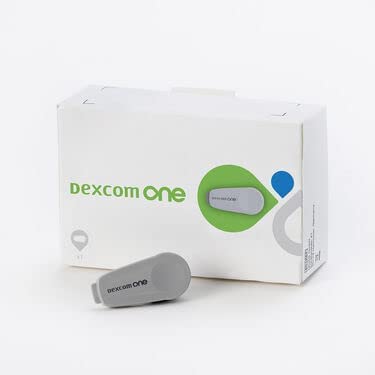
Dexcom OneTransmitter
- ✔️ Enables real-time glucose readings every five minutes
- ✔️ Reusable transmitter lasts approximately three months
- ✔️ Water-resistant to 2.4 metres for active daily wear
- ✔️ Compatible with Dexcom One app for smartphone alerts
- ✔️ Supports overnight hypoglycaemia alerts while you sleep
Price Checker
 Lowest price guarantee
 Includes FREE private prescription


Couldn't load pickup availability
What Is the Dexcom One Transmitter?
If you're living with diabetes and want to move away from constant finger-prick testing, the Dexcom One transmitter is a key part of making that possible. It's the small, reusable device that clips onto your Dexcom One sensor and wirelessly sends your glucose readings to your smartphone or compatible display device — every five minutes, around the clock. Managing blood glucose is one of the most important aspects of diabetes care, and continuous glucose monitoring (CGM) technology has genuinely changed how people do that day to day. You can explore a wider range of CGM products and accessories in our diabetes monitoring collection.
The transmitter itself is compact and discreet. It sits flat against your skin, attached to the sensor pod, and most people barely notice it's there. At £34.99, it represents a straightforward replacement option when your existing transmitter reaches the end of its battery life — typically around three months of continuous use.
How Does the Dexcom One Transmitter Work?
The transmitter works in close partnership with the Dexcom One sensor, which sits just beneath the skin's surface and measures interstitial glucose levels. Here's how the process flows:
- The sensor measures glucose in the fluid between your cells (interstitial fluid) continuously.
- The transmitter receives this raw glucose data from the sensor electrochemically.
- It converts and transmits the data via Bluetooth to the Dexcom One app on your smartphone or a dedicated receiver.
- Readings appear on your screen every five minutes, with trend arrows showing whether your glucose is rising, falling, or stable.
- Customisable alerts notify you if your glucose goes above or below your set thresholds.
The transmitter doesn't require any manual activation once it's clipped into the sensor. It pairs automatically with your device and begins transmitting as soon as the sensor warm-up period is complete — typically around two hours for the Dexcom One system.
Who Should Use the Dexcom One Transmitter?
The Dexcom One system — and therefore this replacement transmitter — is suitable for a broad range of people managing diabetes. It's particularly useful if you find finger-prick testing disruptive, painful, or difficult to maintain consistently throughout the day.
- Adults with type 1 diabetes who require frequent glucose monitoring.
- Adults with type 2 diabetes using insulin therapy.
- People who experience hypoglycaemia unawareness and need overnight alerts.
- Those who want to share glucose data with a carer or family member via the Dexcom Follow app.
It is not currently licensed for use in children under two years of age. If you are pregnant or planning to become pregnant, speak to your diabetes care team before starting or continuing CGM use, as monitoring targets may differ.
How Does the Dexcom One Transmitter Compare to Alternatives?
| Feature | Dexcom One Transmitter | Dexcom G7 (Integrated) |
|---|---|---|
| Transmitter type | Separate, reusable | Integrated, disposable |
| Battery life | ~3 months | Single sensor session (10 days) |
| Warm-up period | ~2 hours | ~30 minutes |
| Water resistance | 2.4 m for 24 hours | 2.4 m for 24 hours |
Is the Dexcom One Transmitter Suitable for Everyday Wear?
Absolutely. The Dexcom One transmitter is designed for continuous, everyday wear. It's water-resistant to a depth of 2.4 metres for up to 24 hours, so showering, swimming, and exercise are all fine. The low-profile design means it sits comfortably under clothing without snagging or causing discomfort for most users. If you do experience any skin irritation around the sensor site — which can occasionally happen with adhesive-based wearables — speak to your diabetes care team about barrier films or alternative placement sites. You might also find it helpful to browse our electrical health and diagnostic range for complementary monitoring tools.
This product is a medical device. Speak to your doctor or pharmacist before using if you have an underlying medical condition or are taking other medicines.
Dexcom One Transmitter specifications
| Treatment category | Diabetes monitoring / Continuous glucose monitoring |
| Mechanism of action | Bluetooth wireless transmission of interstitial glucose data from sensor to display device |
| Effective for | Real-time glucose monitoring in people with diabetes |
| Suitable for | Adults with type 1 or type 2 diabetes using the Dexcom One system |
| Active ingredient | N/A — medical device component |
| Pack size | 1 transmitter |
| UK classification | Medical device (Class IIb) |
| Preparation | Wearable electronic device |
| Route of administration | Transcutaneous (worn on skin surface) |
Specifications of Dexcom One Transmitter
What Is the Dexcom One Transmitter and What Is It Used For?
The Dexcom One transmitter is a reusable medical device component that forms part of the Dexcom One continuous glucose monitoring (CGM) system. It is used by people with diabetes to receive real-time glucose readings without the need for routine finger-prick blood tests. The transmitter clips onto the Dexcom One sensor — which is worn on the back of the upper arm or abdomen — and wirelessly sends glucose data to a compatible smartphone running the Dexcom One app, or to a dedicated receiver.
CGM systems like the Dexcom One are recommended by NHS England for people with type 1 diabetes and for some people with type 2 diabetes who use insulin. The transmitter itself needs replacing approximately every three months when its battery is depleted, making this a routine purchase for existing Dexcom One users.
What Do You Need to Know Before Using the Dexcom One Transmitter?
Before attaching a new transmitter, there are some important considerations to be aware of. This device is not suitable for everyone, and certain conditions or medications may affect its accuracy or suitability.
Do not use this transmitter if:
- You are allergic to any of the materials used in the transmitter or sensor adhesive.
- You are using a non-compatible Dexcom sensor (the transmitter is only compatible with Dexcom One sensors).
- The transmitter is damaged, cracked, or has been submerged beyond its rated depth or duration.
- You are undergoing MRI, CT scanning, or diathermy — remove the entire sensor and transmitter system before these procedures.
Warnings and precautions:
- Do not use CGM readings as the sole basis for insulin dosing decisions without confirming with a finger-prick test if symptoms do not match the reading.
- Inform your diabetes care team if you notice consistently inaccurate readings.
- Keep the transmitter away from strong electromagnetic fields, including airport security scanners where possible.
Medicines that may affect sensor accuracy:
- High-dose paracetamol (acetaminophen) may cause falsely elevated glucose readings.
- Hydroxyurea has been reported to affect CGM sensor accuracy in some systems — discuss with your care team.
How Should You Use the Dexcom One Transmitter?
Setting up your new transmitter is straightforward, but following the steps in order matters. Rushing the process can lead to pairing errors or inaccurate readings during the warm-up phase.
- Wash and dry your hands thoroughly before handling the transmitter or sensor.
- Insert the Dexcom One sensor into the applicator and apply it to clean, dry skin on the back of your upper arm or abdomen.
- Slide the transmitter into the sensor pod from the narrow end until you hear or feel a click.
- Open the Dexcom One app on your compatible smartphone and select "Start Sensor."
- Enter the transmitter serial number when prompted (found on the transmitter packaging).
- Allow the two-hour warm-up period to complete before relying on readings.
- Confirm your first reading with a finger-prick blood glucose test if required by your care team.
| Indication | Age Group | Sensor Wear Duration | Transmitter Replacement |
|---|---|---|---|
| Type 1 diabetes | Adults (18+) | Up to 10 days per sensor | Every ~3 months |
| Type 2 diabetes (insulin-treated) | Adults (18+) | Up to 10 days per sensor | Every ~3 months |
What Are the Possible Side Effects of the Dexcom One Transmitter?
As a wearable medical device rather than a medicine, the Dexcom One transmitter does not cause systemic side effects. However, wearing any adhesive device on the skin for extended periods can cause localised reactions in some people. If you experience persistent discomfort, it's worth speaking to your diabetes care team. You can also explore our skin care collection for products that may help manage minor irritation around the sensor site.
Common side effects (at the sensor/transmitter site):
- Mild redness or erythema around the adhesive patch.
- Itching beneath or around the sensor.
- Minor bruising at the insertion site.
- Temporary skin indentation after sensor removal.
Less common side effects:
- Allergic contact dermatitis to the adhesive or sensor materials.
- Skin breakdown or maceration with prolonged wear in humid conditions.
- Bleeding at the insertion site (usually minor and self-limiting).
How Should You Store the Dexcom One Transmitter?
Proper storage helps maintain the transmitter's battery integrity and electronic components. Follow these guidelines:
- Store below 30°C and away from direct sunlight.
- Keep in a dry environment — avoid bathrooms or areas with high humidity when not in use.
- Do not freeze the transmitter or expose it to temperatures below 10°C for extended periods.
- Keep out of reach of children.
- Do not store near strong magnets or electronic devices that emit strong electromagnetic fields.
- Once attached to a sensor, the transmitter should remain in place for the duration of the sensor session.
For broader diabetes management support, including blood glucose meters and testing supplies, visit our diabetes monitoring collection at Cured Pharmacy.
References
- https://www.nhs.uk/conditions/type-1-diabetes/living-with-type-1-diabetes/continuous-glucose-monitoring-cgm/
- https://www.nhs.uk/conditions/diabetes/
- https://www.nhs.uk/conditions/type-1-diabetes/
- https://www.nhs.uk/conditions/type-2-diabetes/managing-type-2-diabetes/going-for-regular-check-ups/
- https://www.nice.org.uk/guidance/ng17
Written and reviewed by our qualified team
Your safety and success are our highest priorities. Our medical team rigorously evaluates every product and piece of advice we provide, ensuring you receive only the most effective, science-backed solutions available.
Frequently Asked Questions
Where can I buy the Dexcom One transmitter online in the UK?
You can buy the Dexcom One transmitter online in the UK from Cured Pharmacy for £34.99, with no prescription required. It is a medical device component rather than a medicine, so it is available over the counter. Browse our full diabetes monitoring collection for sensors and related accessories too.
How does the Dexcom One transmitter work in the body?
The transmitter doesn't enter the body — it sits on the skin surface and clips onto the Dexcom One sensor pod. The sensor measures glucose in the interstitial fluid just beneath the skin, and the transmitter wirelessly sends those readings via Bluetooth to your smartphone or receiver every five minutes. It's a completely non-invasive process from the transmitter's perspective.
How do I attach the Dexcom One transmitter step by step?
First, apply the Dexcom One sensor to clean, dry skin using the applicator. Then slide the transmitter into the sensor pod from the narrow end until it clicks firmly into place. Open the Dexcom One app, select "Start Sensor," enter the transmitter serial number, and wait approximately two hours for the warm-up period to complete before trusting the readings.
How long does the Dexcom One transmitter battery last?
The Dexcom One transmitter battery lasts approximately three months under normal continuous use. You'll receive a low battery notification through the Dexcom One app before it runs out, giving you time to order a replacement. Each sensor session lasts up to ten days, so one transmitter typically covers around nine sensor sessions.
Can I reuse the Dexcom One transmitter with multiple sensors?
Yes — the Dexcom One transmitter is designed to be reused across multiple sensor sessions within its three-month battery life. When one sensor session ends, you remove the transmitter, discard the used sensor, apply a new sensor, and reattach the same transmitter. This is one of the key differences between the Dexcom One and the all-in-one disposable Dexcom G7.
Is the Dexcom One transmitter waterproof?
The Dexcom One transmitter is water-resistant, rated to a depth of 2.4 metres for up to 24 hours. This means you can shower, bathe, swim, and exercise without removing it. However, prolonged exposure beyond these limits — such as deep diving — is not recommended and may damage the device.
What are the side effects of wearing the Dexcom One transmitter?
The most commonly reported issues are localised skin reactions at the sensor and adhesive site, including redness, itching, or mild bruising. These are related to the sensor insertion and adhesive patch rather than the transmitter itself. If you experience a more significant allergic skin reaction, remove the device and speak to your diabetes care team or GP.
What is the difference between the Dexcom One and Dexcom G7 transmitter?
The Dexcom One uses a separate reusable transmitter that clips onto the sensor and lasts around three months, while the Dexcom G7 has an all-in-one disposable design where the transmitter is built into the sensor pod and discarded after each ten-day session. The G7 also has a shorter warm-up time of approximately 30 minutes compared to around two hours for the Dexcom One.
Who is eligible to use the Dexcom One transmitter?
The Dexcom One system is suitable for adults aged 18 and over with type 1 or type 2 diabetes who require continuous glucose monitoring. It is not currently licensed for children under two years of age. If you are pregnant, breastfeeding, or have a complex medical history, speak to your diabetes care team before starting CGM.
What happens if my Dexcom One transmitter stops working mid-session?
If the transmitter loses connection or stops sending readings, first check that your smartphone's Bluetooth is enabled and that you are within range (typically up to 6 metres). If the issue persists, try restarting the app. If the transmitter has failed completely, you will need to replace it — continue monitoring your glucose with finger-prick testing in the meantime.
Can paracetamol affect the Dexcom One transmitter readings?
High doses of paracetamol (acetaminophen) can interfere with the electrochemical sensor and cause falsely elevated glucose readings on some CGM systems. Standard therapeutic doses are generally considered less likely to cause significant interference, but if you are taking paracetamol regularly, mention this to your diabetes care team. Always confirm unexpected readings with a finger-prick test.
Do I need to remove the Dexcom One transmitter for an MRI scan?
Yes — you must remove the entire Dexcom One sensor and transmitter system before undergoing an MRI, CT scan, X-ray, or diathermy procedure. The strong electromagnetic fields used in these procedures can damage the device and may affect the accuracy of the scan. Always inform the radiographer that you wear a CGM device before your appointment.
How long can you use the Dexcom One CGM system for?
There is no fixed maximum duration for using the Dexcom One system — many people use CGM technology long-term as part of their ongoing diabetes management. The transmitter itself needs replacing every three months, and each sensor is replaced every ten days. Your diabetes care team can advise on whether continued CGM use is appropriate for your individual situation.
What are the alternatives to the Dexcom One transmitter?
Alternatives include the Dexcom G7 (all-in-one disposable CGM), the Abbott FreeStyle Libre 2 and Libre 3 (flash glucose monitoring systems), and the Medtronic Guardian sensor system. Each has different features, wear durations, and compatibility requirements. Speak to your diabetes care team about which system best suits your lifestyle and clinical needs. You can also browse our electrical health and diagnostic range for more options.
What are the latest developments in CGM technology relevant to the Dexcom One?
CGM technology continues to evolve rapidly, with newer systems offering longer sensor wear, faster warm-up times, and improved accuracy. The Dexcom One remains a clinically validated option for adults with diabetes, and NHS England has expanded CGM access for people with type 1 diabetes in recent years. Research published in peer-reviewed journals consistently supports CGM use for improving HbA1c and reducing hypoglycaemic episodes in people with type 1 diabetes.
Written and reviewed by our qualified team

Reviewed by:
Tarun Kumar
Superintendent/ Clinical Lead
📖 Find out more about our team of medical content authors and how we ensure the accuracy of our content with our content guidelines.
Content last updated: 14 Sep 2026

We’re a safe and
regulated UK service

Lowest Price Guarantee

We're convinced you won't find your treatment cheaper, but if you do we'll refund the difference.
Find out more
100% discreet packaging

Discreet, unbranded packaging for every order.
Find out more

Need help?
Talk to our friendly experts now


How our service works

Service setup

Discreet packaging

Express delivery