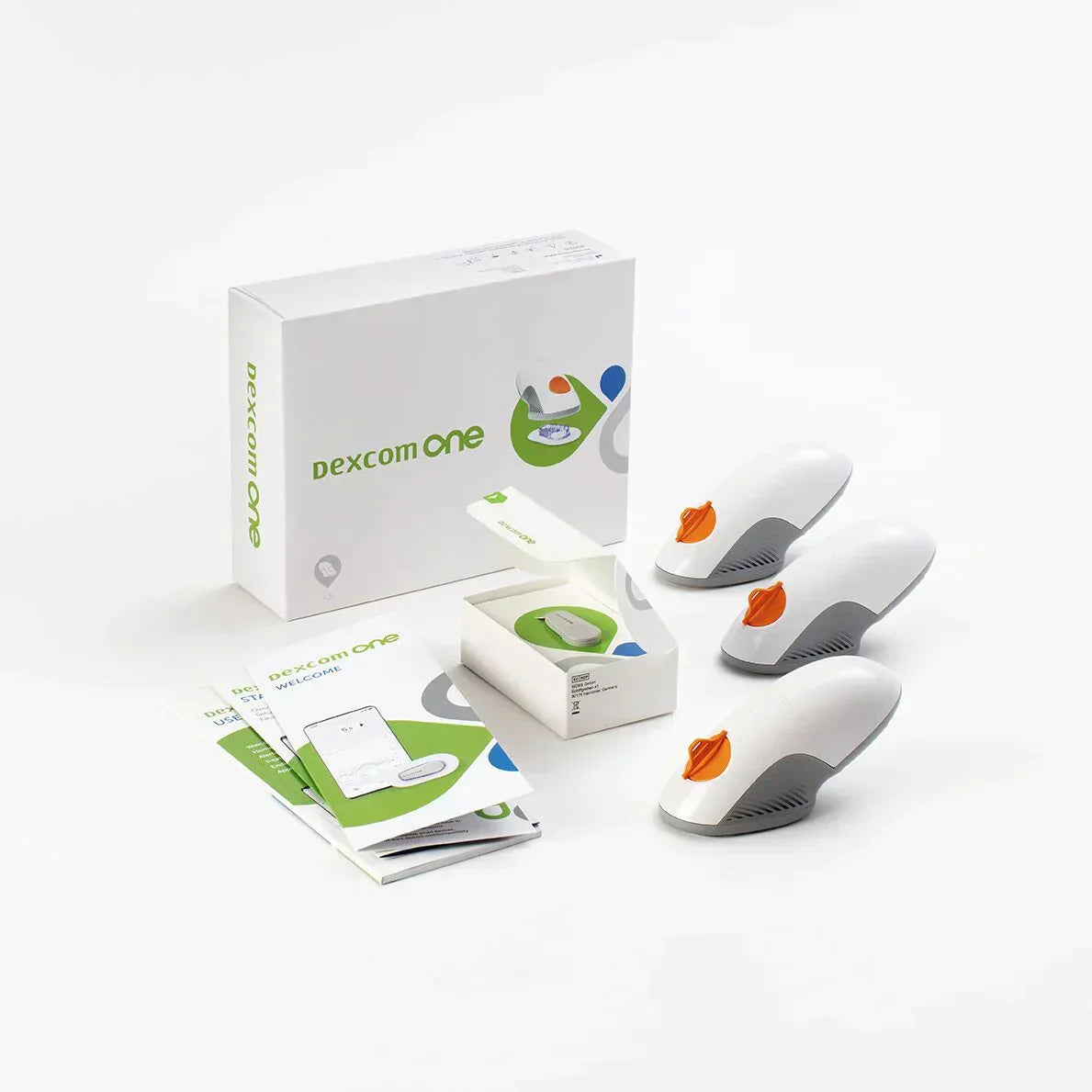
Dexcom ONE 30 Day Starter Kit
Dexcom ONE 30 Day Starter Kit
- ✔️ Provides real-time glucose readings every five minutes automatically
- ✔️ Reduces need for routine finger-prick blood glucose testing
- ✔️ Alerts you instantly to high or low glucose levels
- ✔️ Suitable for adults with type 1 or type 2 diabetes
- ✔️ Each sensor lasts up to 10 days of continuous wear
Price Checker
 Lowest price guarantee
 Includes FREE private prescription


Couldn't load pickup availability
What Is the Dexcom ONE Starter Kit and How Does It Help With Diabetes?
Living with diabetes means keeping a close eye on your glucose levels — and that used to mean multiple finger pricks every single day. The Dexcom ONE starter kit changes that. It is a continuous glucose monitoring (CGM) system designed for adults with diabetes who want real-time glucose readings sent directly to their smartphone, without the constant need for lancets and test strips. If you are managing type 1 or type 2 diabetes and want a clearer, more convenient picture of how your glucose moves throughout the day and night, this kit is worth understanding properly.
The 30 Day Starter Kit includes everything you need to begin monitoring straight away: a transmitter, sensors to cover approximately one month of wear, and access to the Dexcom ONE app. You can explore our full range of diabetes monitoring products at Cured Pharmacy if you are comparing options or need replacement sensors alongside your starter kit.
How Does the Dexcom ONE Continuous Glucose Monitor Work?
The system works by measuring glucose in the interstitial fluid — the fluid surrounding your cells just beneath the skin — rather than directly in your blood. A tiny biosensor is inserted just under the surface of the skin using a simple applicator. Once in place, it takes a glucose reading every five minutes and transmits that data wirelessly to the Dexcom ONE app on your compatible smartphone.
- A small, flexible sensor filament sits just beneath the skin surface
- An electrochemical reaction between glucose and the sensor generates a measurable electrical signal
- The transmitter converts this signal and sends it via Bluetooth to your phone
- The app displays your current glucose level, a trend arrow showing whether levels are rising or falling, and a graph of the past few hours
- Customisable alerts notify you if your glucose goes too high or too low
Each sensor lasts up to 10 days, after which you simply replace it. The transmitter is reusable across multiple sensors.
Who Is the Dexcom ONE 30 Day Starter Kit Suitable For?
This kit is intended for adults aged 18 and over who have been diagnosed with diabetes and are looking to move away from — or reduce — routine finger-prick testing. It is particularly useful if you experience hypoglycaemia unawareness, have difficulty maintaining stable glucose levels, or simply want more data to share with your diabetes care team.
- Adults with type 1 diabetes using insulin therapy
- Adults with type 2 diabetes on insulin or other glucose-lowering medicines
- People who want to understand how food, exercise, and stress affect their glucose
- Those who find frequent finger-prick testing difficult or painful
It is not currently licensed for use in children under 2 years of age. Always discuss starting a CGM with your GP or diabetes specialist before you begin, particularly if you are pregnant or have a complex medication regimen.
How Does the Dexcom ONE Compare to Other CGM Options?
| Feature | Dexcom ONE | FreeStyle Libre 2 |
|---|---|---|
| Sensor wear time | Up to 10 days | Up to 14 days |
| Real-time alerts | Yes — automatic glucose alerts | Yes — optional alarms |
| Scanning required | No — continuous automatic transmission | No (Libre 2 transmits automatically) |
| Smartphone compatibility | Selected Android and iOS devices | Selected Android and iOS devices |
How Should You Store the Dexcom ONE Starter Kit?
Sensors should be stored at between 2°C and 25°C — so a cool, dry cupboard is ideal. Avoid leaving them in a car glove box in summer or near a radiator, as heat can degrade the sensor chemistry and affect accuracy. The transmitter itself can be stored at room temperature when not in use.
If you are also managing other aspects of your health alongside diabetes, you might find it helpful to browse our vitamins and supplements range, which includes products that support general wellbeing for people with long-term conditions. Always check with your pharmacist before starting any new supplement if you are on diabetes medication.
This product is a medical device. Speak to your doctor or pharmacist before using if you have an underlying medical condition or are taking other medicines.
Dexcom ONE 30 Day Starter Kit specifications
| Treatment category | Diabetes management / continuous glucose monitoring |
| Mechanism of action | Electrochemical interstitial glucose biosensor with Bluetooth transmission |
| Effective for | Real-time glucose monitoring in adults with diabetes |
| Suitable for | Adults aged 18 and over with type 1 or type 2 diabetes |
| Active component | Electrochemical glucose biosensor filament |
| Pack contents | Transmitter + sensors (approx. 30-day supply) |
| Sensor wear time | Up to 10 days per sensor |
| UK classification | CE-marked medical device (Class IIb) |
| Device class | Continuous glucose monitor (CGM) |
| Preparation | Ready to use with applicator included |
| Route of administration | Subcutaneous sensor insertion (abdomen or upper arm) |
Specifications of Dexcom ONE 30 Day Starter Kit
What Is the Dexcom ONE 30 Day Starter Kit and What Is It Used For?
The Dexcom ONE 30 Day Starter Kit is a continuous glucose monitoring (CGM) system used by adults with diabetes to track their glucose levels in real time, 24 hours a day. Unlike traditional blood glucose meters that give you a single snapshot reading, the Dexcom ONE provides a continuous stream of data — a reading every five minutes — along with trend arrows that show whether your glucose is rising, falling, or staying steady. This helps you and your healthcare team make more informed decisions about food, activity, and medication.
The NHS recognises CGM as a valuable tool for people with diabetes, particularly those on insulin therapy, as it can help reduce the frequency and severity of hypoglycaemic episodes. The kit is not a medicine but a regulated medical device, and it is available without a prescription for eligible adults.
What Do You Need to Know Before Using the Dexcom ONE?
Before you start using this device, there are some important considerations to be aware of. Please read the following carefully.
Do not use the Dexcom ONE if:
- You are under 18 years of age
- You have a known allergy to any of the sensor materials, including medical-grade adhesive
- You are undergoing MRI, CT scanning, or diathermy — remove the sensor and transmitter before these procedures
- You are on dialysis (the device has not been validated in this population)
Warnings and precautions:
- Always confirm with a fingerstick blood glucose test if your symptoms do not match the sensor reading before making any treatment decision
- High doses of paracetamol (acetaminophen) may interfere with sensor accuracy — speak to your pharmacist if you regularly take paracetamol
- Hydroxyurea, a medicine used in some blood disorders, is known to affect Dexcom sensor readings
- Sensor readings may be less accurate during periods of rapid glucose change
- If you experience persistent skin irritation, redness, or swelling at the sensor site, remove the sensor and consult a healthcare professional
Known interactions:
- Paracetamol (high doses) — may falsely elevate glucose readings
- Hydroxyurea — known to interfere with electrochemical glucose sensors
- Vitamin C supplements in very high doses — may affect accuracy in some CGM systems; check with your pharmacist
How Should You Use the Dexcom ONE Sensor and Transmitter?
Setting up your Dexcom ONE for the first time is straightforward, but it is important to follow each step carefully to ensure accurate readings from the outset.
- Download the Dexcom ONE app on your compatible smartphone and create an account
- Wash your hands thoroughly and clean the insertion site (abdomen or back of upper arm) with an alcohol wipe; allow to dry completely
- Remove the sensor from its packaging and peel the adhesive backing
- Press the applicator firmly against the skin and press the button to insert the sensor filament
- Remove the applicator and snap the transmitter onto the sensor pod until it clicks
- Open the app and follow the on-screen instructions to pair the transmitter via Bluetooth
- Wait for the two-hour warm-up period before your first reading appears
- Set your high and low glucose alert thresholds as advised by your diabetes care team
| Indication | Age Group | Sensor Wear | Reading Frequency |
|---|---|---|---|
| Type 1 diabetes | Adults (18+) | Up to 10 days per sensor | Every 5 minutes automatically |
| Type 2 diabetes | Adults (18+) | Up to 10 days per sensor | Every 5 minutes automatically |
If you are also managing weight as part of your diabetes care, you may find our weight loss range a useful complement to your monitoring routine — always discuss any weight management plan with your GP first.
What Are the Possible Side Effects of the Dexcom ONE?
As with any wearable medical device that involves skin contact and a small subcutaneous insertion, some people do experience reactions. Most are mild and resolve on their own.
Common side effects:
- Mild redness or irritation at the sensor insertion site
- Itching under or around the adhesive patch
- Minor bruising at the insertion point
- Temporary discomfort during sensor insertion
Less common side effects:
- Allergic contact dermatitis from the adhesive
- Skin indentation or scarring with repeated use at the same site
- Sensor inaccuracy leading to missed high or low glucose alerts
- Infection at the insertion site (rare — seek medical advice promptly if you notice pus, increasing warmth, or spreading redness)
Rotate your sensor insertion sites regularly to reduce the risk of skin reactions and tissue changes. If you develop a significant skin reaction, remove the sensor and contact your GP or diabetes nurse.
How Should You Store the Dexcom ONE Starter Kit?
- Store sensors at 2°C to 25°C in a cool, dry place away from direct sunlight
- Do not freeze sensors — freezing will damage the biosensor chemistry
- Keep sensors in their original sealed packaging until ready to use
- Store the transmitter at room temperature (15°C–30°C) when not in use
- Keep all components away from children
- Check the expiry date on each sensor before use — do not use expired sensors
- Do not store near strong electromagnetic fields or magnets
For broader health support alongside your diabetes management, our electrical health and diagnostic range includes blood pressure monitors and other devices that can help you keep track of your overall health at home.
References
- https://www.nhs.uk/conditions/diabetes/
- https://www.nhs.uk/conditions/type-1-diabetes/living-with-type-1-diabetes/continuous-glucose-monitoring-cgm/
- https://www.nhs.uk/conditions/type-2-diabetes/managing-type-2-diabetes/blood-sugar-testing/
- https://www.nhs.uk/conditions/low-blood-sugar-hypoglycaemia/
- https://www.nice.org.uk/guidance/ng17
Written and reviewed by our qualified team
Your safety and success are our highest priorities. Our medical team rigorously evaluates every product and piece of advice we provide, ensuring you receive only the most effective, science-backed solutions available.
Frequently Asked Questions
Where can I buy the Dexcom ONE starter kit online in the UK?
You can order the Dexcom ONE 30 Day Starter Kit directly from Cured Pharmacy, a GPhC-registered online pharmacy. No prescription is required for adults with diabetes, and the kit is dispatched promptly from our UK-based pharmacy. Browse our full diabetes monitoring range for sensors, replacement transmitters, and other CGM accessories.
How does the Dexcom ONE work in the body?
The Dexcom ONE uses a tiny electrochemical biosensor inserted just beneath the skin to measure glucose in the interstitial fluid — the fluid that surrounds your body's cells. It takes a reading every five minutes and sends the data wirelessly via Bluetooth to the Dexcom ONE smartphone app. This gives you a continuous, real-time view of your glucose levels and trend direction throughout the day and night.
How do I apply the Dexcom ONE sensor step by step?
Start by washing your hands and cleaning the insertion site — either your abdomen or the back of your upper arm — with an alcohol wipe, then let it dry fully. Press the applicator firmly against the skin and activate it to insert the sensor filament, then snap the transmitter onto the sensor pod. Open the Dexcom ONE app, follow the pairing instructions, and allow the two-hour warm-up period before your first reading appears.
How long does each Dexcom ONE sensor last?
Each Dexcom ONE sensor is designed to last up to 10 days of continuous wear before it needs to be replaced. The 30 Day Starter Kit includes enough sensors to provide approximately one month of monitoring. After 10 days, the app will alert you that the sensor session has ended and guide you through replacing it.
Can I use the Dexcom ONE if I have type 2 diabetes?
Yes, the Dexcom ONE is suitable for adults with both type 1 and type 2 diabetes. It is particularly beneficial if you are on insulin therapy or if you experience difficulty recognising the symptoms of low blood sugar. Speak to your GP or diabetes nurse before starting, as they can advise whether CGM fits your current management plan.
What are the side effects of wearing a Dexcom ONE sensor?
The most commonly reported side effects are mild skin irritation, redness, or itching at the sensor insertion site, which usually settle within a day or two. Less commonly, some people experience allergic contact dermatitis from the adhesive patch. Rotating your insertion site with each new sensor helps reduce the risk of skin reactions and localised tissue changes.
Does the Dexcom ONE replace finger-prick blood glucose testing?
The Dexcom ONE significantly reduces the need for routine finger-prick tests, but it does not replace them entirely in all situations. If your symptoms do not match what the sensor is showing — for example, you feel hypoglycaemic but the reading appears normal — you should confirm with a fingerstick blood glucose meter before acting. Always follow the guidance of your diabetes care team regarding when to use a meter alongside your CGM.
What is the difference between the Dexcom ONE and the Dexcom G7?
The Dexcom ONE is an accessible entry-level CGM with a 10-day sensor wear time and a separate transmitter that clips onto the sensor. The Dexcom G7 is a newer model with a fully integrated all-in-one sensor and transmitter, a 15-day wear period, a shorter warm-up time of around 30 minutes, and additional connectivity features including direct-to-smartwatch display. Both measure interstitial glucose in real time and send alerts for high and low levels.
What medicines can interfere with the Dexcom ONE sensor readings?
High doses of paracetamol (acetaminophen) are known to potentially cause falsely elevated glucose readings on the Dexcom ONE sensor. Hydroxyurea, a medicine used in certain blood disorders, is also known to interfere with electrochemical glucose sensors. If you regularly take either of these medicines, speak to your pharmacist or diabetes team before starting CGM.
Who is eligible to use the Dexcom ONE 30 Day Starter Kit?
The Dexcom ONE is intended for adults aged 18 and over who have been diagnosed with diabetes. It is particularly well suited to people on insulin therapy, those with hypoglycaemia unawareness, or anyone who wants more detailed glucose data to support their self-management. It is not validated for use in children under 2 years of age, and people on dialysis should consult their specialist before use.
What happens if the Dexcom ONE sensor falls off early?
If your sensor detaches before the 10-day session is complete, you will need to apply a new sensor and start a fresh session in the app. To help sensors stay in place, make sure the skin is completely clean, dry, and free from lotions or oils before application. Some people use additional over-patch adhesives — available separately — to extend wear time in hot or active conditions.
How long can you use the Dexcom ONE continuously?
There is no fixed maximum duration for using the Dexcom ONE — many people with diabetes use CGM as an ongoing, long-term part of their diabetes management. Each sensor session lasts up to 10 days, after which you replace the sensor and begin a new session. Your diabetes care team can advise on whether continuous long-term use is appropriate for your individual situation.
Can I shower, swim, or exercise while wearing the Dexcom ONE?
Yes — the Dexcom ONE sensor and transmitter are water-resistant and can be worn while showering, bathing, and swimming in shallow water up to a depth of 2.4 metres for up to 24 hours. Vigorous exercise and sweating should not affect the sensor's function, though heavy perspiration may occasionally loosen the adhesive patch over time. Patting the site dry after swimming helps maintain adhesion.
What are the latest studies on continuous glucose monitoring for type 2 diabetes?
Research published in recent years has shown that CGM use in adults with type 2 diabetes — including those not on insulin — can lead to meaningful reductions in HbA1c and time spent in hypoglycaemia. NICE guidance (NG17 and NG28) has progressively expanded recommendations for CGM access in both type 1 and type 2 diabetes. Speak to your GP or diabetes specialist about whether CGM is recommended as part of your NHS care plan.
What alternatives are there to the Dexcom ONE for glucose monitoring?
The main alternatives to the Dexcom ONE in the UK include the FreeStyle Libre 2 and Libre 3 (Abbott), and the Dexcom G7. Traditional blood glucose meters with test strips remain an option for those who prefer or require fingerstick testing. You can compare available options in our diabetes monitoring collection, and your diabetes care team can help you choose the most suitable device for your lifestyle and clinical needs.
Written and reviewed by our qualified team

Reviewed by:
Tarun Kumar
Superintendent/ Clinical Lead
📖 Find out more about our team of medical content authors and how we ensure the accuracy of our content with our content guidelines.
Content last updated: 14 Sep 2026

We’re a safe and
regulated UK service

Lowest Price Guarantee

We're convinced you won't find your treatment cheaper, but if you do we'll refund the difference.
Find out more
100% discreet packaging

Discreet, unbranded packaging for every order.
Find out more

Need help?
Talk to our friendly experts now


How our service works

Service setup

Discreet packaging

Express delivery