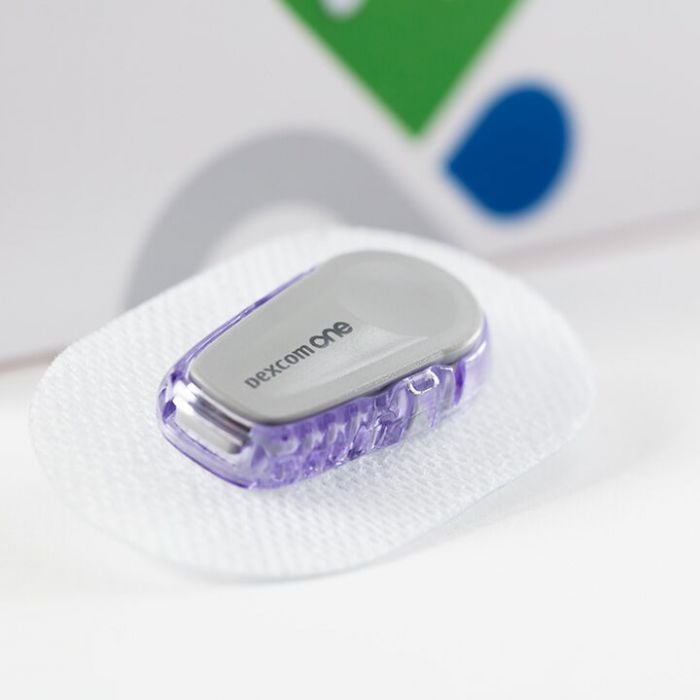
Dexcom One 3 Month Bundle
Dexcom One 3 Month Bundle
- ✔️ Provides real-time glucose readings every 5 minutes continuously
- ✔️ Covers approximately 30 days of uninterrupted glucose monitoring
- ✔️ No fingerprick calibration required during 10-day sensor wear
- ✔️ Customisable high and low glucose alerts help prevent hypoglycaemia
- ✔️ Suitable for adults with type 1 and type 2 diabetes
Price Checker
 Lowest price guarantee
 Includes FREE private prescription


Couldn't load pickup availability
What Is the Dexcom One 3 Month Bundle?
Managing diabetes day to day takes real effort. Checking your glucose levels, adjusting meals, tracking patterns — it adds up. The Dexcom One 3 month bundle is designed to take some of that burden away by giving you continuous, real-time glucose readings without the need for constant fingerprick tests. This bundle contains three Dexcom One sensors, providing approximately 30 days of uninterrupted monitoring — enough to cover a full month of daily life. At £314.99, it represents a practical, cost-conscious way to stay on top of your glucose management. You can explore our full range of monitoring tools in our diabetes monitoring collection.
The Dexcom One is a CE-marked continuous glucose monitoring (CGM) system approved for use in adults aged 2 years and over with diabetes. It is not a prescription-only device, meaning you can purchase it directly without a GP referral. That said, it is always worth discussing CGM use with your diabetes care team, particularly if you are adjusting your insulin regimen based on sensor readings.
How Does the Dexcom One Sensor Work?
The Dexcom One uses an electrochemical biosensor — a tiny filament inserted just beneath the skin, typically on the back of the upper arm or abdomen. Once in place, it measures glucose in the interstitial fluid (the fluid surrounding your cells) rather than directly in the blood. Readings are taken automatically every 5 minutes and transmitted wirelessly via Bluetooth to the Dexcom One app on a compatible smartphone. No separate receiver is required.
- The sensor filament sits in the subcutaneous tissue and detects glucose electrochemically
- Readings are sent to your phone every 5 minutes, giving you up to 288 readings per day
- Customisable high and low glucose alerts notify you before levels become dangerous
- Each sensor lasts up to 10 days before replacement is needed
- No fingerprick calibration is required during the wear period
Who Should Use the Dexcom One 3 Month Bundle?
The Dexcom One is suitable for adults living with type 1 or type 2 diabetes who want a clearer, more continuous picture of their glucose levels. It is particularly useful if you find fingerprick testing disruptive, if you experience hypoglycaemia unawareness, or if you simply want to understand how food, exercise, and stress affect your glucose throughout the day.
- Adults with type 1 diabetes managing insulin therapy
- Adults with type 2 diabetes on insulin or at risk of hypoglycaemia
- People who experience hypoglycaemia unawareness
- Those who want to reduce the frequency of fingerprick testing
It is not recommended for use in children under 2 years of age. If you are pregnant, have a pacemaker, or are undergoing MRI scanning, speak to your healthcare team before using any CGM device.
How Does the Dexcom One Compare to Other CGM Options?
| Feature | Dexcom One 3 Month Bundle | FreeStyle Libre 2 |
|---|---|---|
| Sensor wear duration | 10 days per sensor | 14 days per sensor |
| Real-time continuous readings | Yes — every 5 minutes automatically | Requires scanning (scan-on-demand) |
| Glucose alerts | Yes — customisable high/low alerts | Yes — with Libre 2 app |
| Fingerprick calibration needed | No | No |
| Prescription required | No | No |
How Should You Store and Handle the Dexcom One Sensors?
Proper storage matters more than people often realise. The Dexcom One 3 month bundle sensors should be stored at room temperature, below 30°C, and kept away from direct sunlight and moisture. Do not refrigerate the sensors. Check the expiry date on each sensor before use — an expired sensor may not perform accurately. If you are also managing other aspects of your health, our vitamins and supplements collection includes products that support general wellbeing alongside your diabetes management plan.
This product is a medical device. Speak to your doctor or pharmacist before using if you have an underlying medical condition or are taking other medicines.
Dexcom One 3 Month Bundle specifications
| Treatment category | Continuous glucose monitoring (CGM) |
| Mechanism of action | Electrochemical interstitial glucose biosensor |
| Effective for | Real-time glucose monitoring in adults with diabetes |
| Suitable for | Adults aged 2 years and over with type 1 or type 2 diabetes |
| Active ingredient | N/A — medical device (no active pharmaceutical ingredient) |
| Pack size | 3 sensors (approximately 30 days of monitoring) |
| UK classification | CE-marked medical device |
| Preparation | Subcutaneous sensor with adhesive patch |
| Route of administration | Subcutaneous insertion (upper arm or abdomen) |
Specifications of Dexcom One 3 Month Bundle
What Is the Dexcom One and What Is It Used For?
The Dexcom One is a continuous glucose monitoring system used by adults with diabetes to track their glucose levels in real time, 24 hours a day. Unlike traditional blood glucose meters that give you a single snapshot reading, the Dexcom One provides a continuous stream of data — a reading every 5 minutes — so you can see not just where your glucose is right now, but which direction it is heading. This is particularly valuable for spotting patterns, preventing hypoglycaemia, and making more informed decisions about food, activity, and insulin.
The NHS recognises CGM as a clinically effective tool for improving glucose management in people with diabetes. The Dexcom One 3 month bundle is available without a prescription and is suitable for adults who want to self-fund their CGM use or supplement NHS-provided monitoring.
What Do You Need to Know Before Using the Dexcom One?
Before you start using the Dexcom One, there are some important safety considerations to be aware of. This device is not suitable for everyone, and certain situations require extra caution.
Do not use the Dexcom One if:
- You are under 2 years of age
- You are allergic to any of the sensor materials, including the adhesive
- You are undergoing MRI, CT scanning, or diathermy — remove the sensor beforehand
- You have been advised by your healthcare team that CGM is not appropriate for you
Use with caution and speak to your doctor if:
- You are pregnant or planning to become pregnant
- You have a pacemaker or other implanted electronic device
- You experience frequent hypoglycaemia unawareness
- You are critically ill or in hospital — sensor accuracy may be reduced
Known interactions that may affect sensor readings:
- High-dose paracetamol (acetaminophen) — may cause falsely elevated glucose readings
- Hydroxyurea — may interfere with sensor accuracy
- Mannitol — may affect interstitial glucose readings
Always confirm a hypoglycaemic reading with a fingerprick blood glucose test before treating, particularly if your symptoms do not match the sensor reading.
How Should You Use the Dexcom One Sensor?
Applying the Dexcom One sensor is straightforward, but following the correct steps ensures accurate readings and good skin tolerance. The sensor applicator is designed for single-handed use and is pre-loaded — no manual assembly is required.
- Wash your hands thoroughly with soap and water and dry them completely
- Choose your insertion site — the back of the upper arm or abdomen are recommended
- Clean the skin with an alcohol wipe and allow it to dry fully (at least 30 seconds)
- Remove the sensor applicator from its packaging and peel off the adhesive backing
- Press the applicator firmly against the skin and press the button to insert the sensor
- Remove the applicator — the sensor and transmitter will remain in place
- Open the Dexcom One app on your compatible smartphone and follow the on-screen pairing instructions
- Allow a 2-hour warm-up period before the sensor begins providing readings
| User Group | Recommended Insertion Site | Sensor Duration | Calibration Required |
|---|---|---|---|
| Adults (type 1 diabetes) | Upper arm or abdomen | Up to 10 days | No |
| Adults (type 2 diabetes) | Upper arm or abdomen | Up to 10 days | No |
What Are the Possible Side Effects of the Dexcom One?
Like any wearable medical device, the Dexcom One can cause localised skin reactions in some people. Most side effects are mild and resolve on their own once the sensor is removed. Serious reactions are uncommon but should be taken seriously if they occur.
Common side effects:
- Mild redness or irritation at the sensor insertion site
- Itching under or around the adhesive patch
- Minor bruising at the insertion point
- Temporary discomfort during sensor insertion
Less common side effects:
- Allergic contact dermatitis (skin rash) from the adhesive
- Skin indentation or scarring with prolonged use at the same site
- Infection at the insertion site (rare — seek medical advice promptly if suspected)
- Sensor inaccuracy during periods of rapid glucose change or dehydration
Rotate your insertion sites with each new sensor to reduce the risk of skin irritation and tissue changes. If you develop a significant skin reaction, remove the sensor and contact your pharmacist or GP. You may also find it helpful to browse our skin care collection for products that support skin health around adhesive sites.
How Should You Store the Dexcom One Sensors?
- Store sensors at room temperature, between 2°C and 30°C
- Do not refrigerate or freeze the sensors
- Keep away from direct sunlight, heat sources, and moisture
- Store in the original packaging until ready to use
- Check the expiry date printed on each sensor before use — do not use expired sensors
- Keep out of reach of children
- Dispose of used sensors and applicators in accordance with your local sharps disposal guidelines
If you are managing multiple aspects of your health alongside diabetes, our electrical health and diagnostic collection includes a range of monitoring devices and health tools to support your overall wellbeing.
References
- https://www.nhs.uk/conditions/type-1-diabetes/living-with-type-1-diabetes/continuous-glucose-monitoring-cgm/
- https://www.nhs.uk/conditions/diabetes/
- https://www.nhs.uk/conditions/type-1-diabetes/
- https://www.nhs.uk/conditions/type-2-diabetes/
- https://www.nhs.uk/conditions/low-blood-sugar-hypoglycaemia/
- https://www.nice.org.uk/guidance/ng17
Written and reviewed by our qualified team
Your safety and success are our highest priorities. Our medical team rigorously evaluates every product and piece of advice we provide, ensuring you receive only the most effective, science-backed solutions available.
Frequently Asked Questions
Where can I buy the Dexcom One 3 month bundle online in the UK?
You can buy the Dexcom One 3 month bundle directly from Cured Pharmacy online at £314.99, with no prescription required. It is dispatched from a GPhC-registered UK pharmacy, so you can be confident in the authenticity of the product. Browse our full diabetes monitoring collection for related products and accessories.
How does the Dexcom One sensor work in the body?
The Dexcom One uses a tiny electrochemical biosensor filament inserted just beneath the skin to measure glucose in the interstitial fluid — the fluid surrounding your cells — rather than directly in the blood. Readings are taken automatically every 5 minutes and sent wirelessly via Bluetooth to the Dexcom One smartphone app. This gives you a continuous, real-time picture of your glucose levels and the direction they are trending.
How long does each sensor in the Dexcom One 3 month bundle last?
Each individual Dexcom One sensor lasts up to 10 days of continuous wear before it needs to be replaced. The 3 month bundle contains three sensors, which together provide approximately 30 days of monitoring. After 10 days, the sensor will alert you that it needs replacing, and you simply apply a new one.
Do I need a prescription to buy the Dexcom One 3 month bundle?
No, the Dexcom One 3 month bundle does not require a prescription in the UK — it is a CE-marked medical device available over the counter. However, it is always a good idea to discuss CGM use with your diabetes care team, especially if you are adjusting your insulin doses based on sensor readings. Your GP or diabetes nurse can also advise on whether you may be eligible for NHS-funded CGM.
Can I use the Dexcom One if I have type 2 diabetes?
Yes, the Dexcom One is suitable for adults with both type 1 and type 2 diabetes. It is particularly useful for people with type 2 diabetes who are on insulin therapy or who experience episodes of hypoglycaemia. Continuous glucose monitoring can help you understand how your diet, activity levels, and medication affect your glucose throughout the day.
How do I apply the Dexcom One sensor step by step?
Start by washing and drying your hands, then clean your chosen insertion site — the back of the upper arm or abdomen — with an alcohol wipe and allow it to dry for at least 30 seconds. Press the pre-loaded applicator firmly against the skin, press the button to insert the sensor, then remove the applicator and pair the sensor with the Dexcom One app on your smartphone. Allow a 2-hour warm-up period before readings begin.
What are the side effects of wearing a Dexcom One sensor?
The most common side effects are mild skin irritation, redness, or itching at the sensor insertion site, which usually resolve after the sensor is removed. Less commonly, some people experience an allergic reaction to the adhesive patch. Rotating your insertion site with each new sensor helps reduce the risk of skin reactions and tissue changes over time.
How do I manage skin irritation from the Dexcom One adhesive?
If you experience mild irritation, try rotating your insertion site with each new sensor and ensuring the skin is completely dry before application. Some people find that applying a thin barrier film or skin prep wipe before the sensor helps reduce adhesive reactions. If you develop a significant rash, blistering, or signs of infection, remove the sensor and speak to your pharmacist or GP promptly.
Is the Dexcom One accurate enough to replace fingerprick testing?
The Dexcom One is clinically validated for accuracy and is designed to reduce — but not entirely replace — fingerprick testing in all situations. You should always confirm a hypoglycaemic reading with a fingerprick blood glucose test before treating, as interstitial glucose readings can lag slightly behind blood glucose during rapid changes. Your diabetes care team can advise on when fingerprick confirmation is most important.
What happens if my Dexcom One sensor falls off early?
If your sensor adhesive lifts or the sensor detaches before the 10-day wear period is complete, you will need to apply a new sensor — the detached sensor cannot be reapplied. To help sensors stay in place, ensure the skin is clean, dry, and free from lotions or oils before application. Dexcom also offers adhesive patches that can be applied over the sensor to extend adhesion in active or sweaty conditions.
Can I shower, swim, or exercise while wearing the Dexcom One?
Yes, the Dexcom One sensor is water-resistant and can be worn during showering, swimming, and exercise. It is rated to withstand immersion in up to 2.4 metres of water for up to 24 hours. However, prolonged exposure to very hot water (such as hot tubs) may affect adhesion, so take care in those situations.
Who is eligible for the Dexcom One 3 month bundle?
The Dexcom One 3 month bundle is suitable for adults aged 2 years and over with type 1 or type 2 diabetes who wish to monitor their glucose continuously. It is not suitable for people who are allergic to sensor materials, those undergoing MRI or CT scanning, or those with certain implanted electronic devices. Speak to your healthcare team if you are unsure whether CGM is appropriate for you.
How does the Dexcom One compare to the FreeStyle Libre 2?
The key difference is that the Dexcom One sends glucose readings to your phone automatically every 5 minutes without any scanning required, whereas the FreeStyle Libre 2 requires you to scan the sensor to get a reading. The Dexcom One sensor lasts 10 days compared to 14 days for the Libre 2. Both devices offer customisable glucose alerts and do not require fingerprick calibration.
How long can you use the Dexcom One continuously?
There is no defined maximum duration for using the Dexcom One — many people use CGM as an ongoing part of their diabetes management for months or years. Each individual sensor must be replaced every 10 days, and you should rotate insertion sites to protect skin health over the long term. Regular review with your diabetes care team is recommended to ensure CGM continues to benefit your glucose management.
What does the latest research say about continuous glucose monitoring for diabetes?
Clinical evidence consistently shows that CGM use is associated with improved HbA1c levels, reduced hypoglycaemic episodes, and better quality of life in people with both type 1 and type 2 diabetes. NICE guidelines support the use of real-time CGM for adults with type 1 diabetes, and evidence for type 2 diabetes is growing. If you are also looking to support your overall health, our vitamins and supplements collection includes products that complement a healthy diabetes management plan.
Written and reviewed by our qualified team

Reviewed by:
Tarun Kumar
Superintendent/ Clinical Lead
📖 Find out more about our team of medical content authors and how we ensure the accuracy of our content with our content guidelines.
Content last updated: 14 Sep 2026

We’re a safe and
regulated UK service

Lowest Price Guarantee

We're convinced you won't find your treatment cheaper, but if you do we'll refund the difference.
Find out more
100% discreet packaging

Discreet, unbranded packaging for every order.
Find out more

Need help?
Talk to our friendly experts now


How our service works

Service setup

Discreet packaging

Express delivery